~/grkn/posts $ cat hey-http-load-generator.md
Hey: HTTP Load Generator
Bir benchmark programı mı arıyorsunuz? Web uygulamanıza biraz trafik göndermeniz mi gerekiyor? hey ile nasıl yapılacağını öğrenin.
hey, bir web uygulamasına yük gönderen küçük bir programdır. Go ile yazılmıştır.
Daha önce Apache Benchmark (ab) kullandıysanız, hey’i ona bir alternatif olarak düşünebilirsiniz. Yüksek yük altında bir API’nin performans etkisini test etmem gerektiğinde hey kullanıyorum. Ya da yeni bir sunucu kurmam gerektiğinde, üzerinde bir website oluşturuyorum, sonra bir WordPress websitesinin dosyalarını içine klonluyorum, trafik gönderiyorum ve sunucuyu buna göre ayarlıyorum. Bir framework’ün performansı hakkında merak ettiğim bir şey varsa, karşılaştırmalı benchmark için onu kullanıyorum.
Kurulum
Ya da Mac kullanıyorsanız ve brew paket yöneticiniz varsa, brew install hey ile kurabilirsiniz.
Kullanım
➜ ~ hey --help
Usage: hey [options...] <url>
Options:
  -n  Number of requests to run. Default is 200.
  -c  Number of workers to run concurrently. Total number of requests cannot
      be smaller than the concurrency level. Default is 50.
  -q  Rate limit, in queries per second (QPS) per worker. Default is no rate limit.
  -z  Duration of application to send requests. When duration is reached,
      application stops and exits. If duration is specified, n is ignored.
      Examples: -z 10s -z 3m.
  -o  Output type. If none provided, a summary is printed.
      "csv" is the only supported alternative. Dumps the response
      metrics in comma-separated values format.
  -m  HTTP method, one of GET, POST, PUT, DELETE, HEAD, OPTIONS.
  -H  Custom HTTP header. You can specify as many as needed by repeating the flag.
      For example, -H "Accept: text/html" -H "Content-Type: application/xml" .
  -t  Timeout for each request in seconds. Default is 20, use 0 for infinite.
  -A  HTTP Accept header.
  -d  HTTP request body.
  -D  HTTP request body from file. For example, /home/user/file.txt or ./file.txt.
  -T  Content-type, defaults to "text/html".
  -a  Basic authentication, username:password.
  -x  HTTP Proxy address as host:port.
  -h2 Enable HTTP/2.
  -host  HTTP Host header.
  -disable-compression  Disable compression.
  -disable-keepalive    Disable keep-alive, prevents re-use of TCP
                         connections between different HTTP requests.
  -disable-redirects    Disable following of HTTP redirects
  -cpus  Number of used cpu cores.
         (default for current machine is 8 cores)
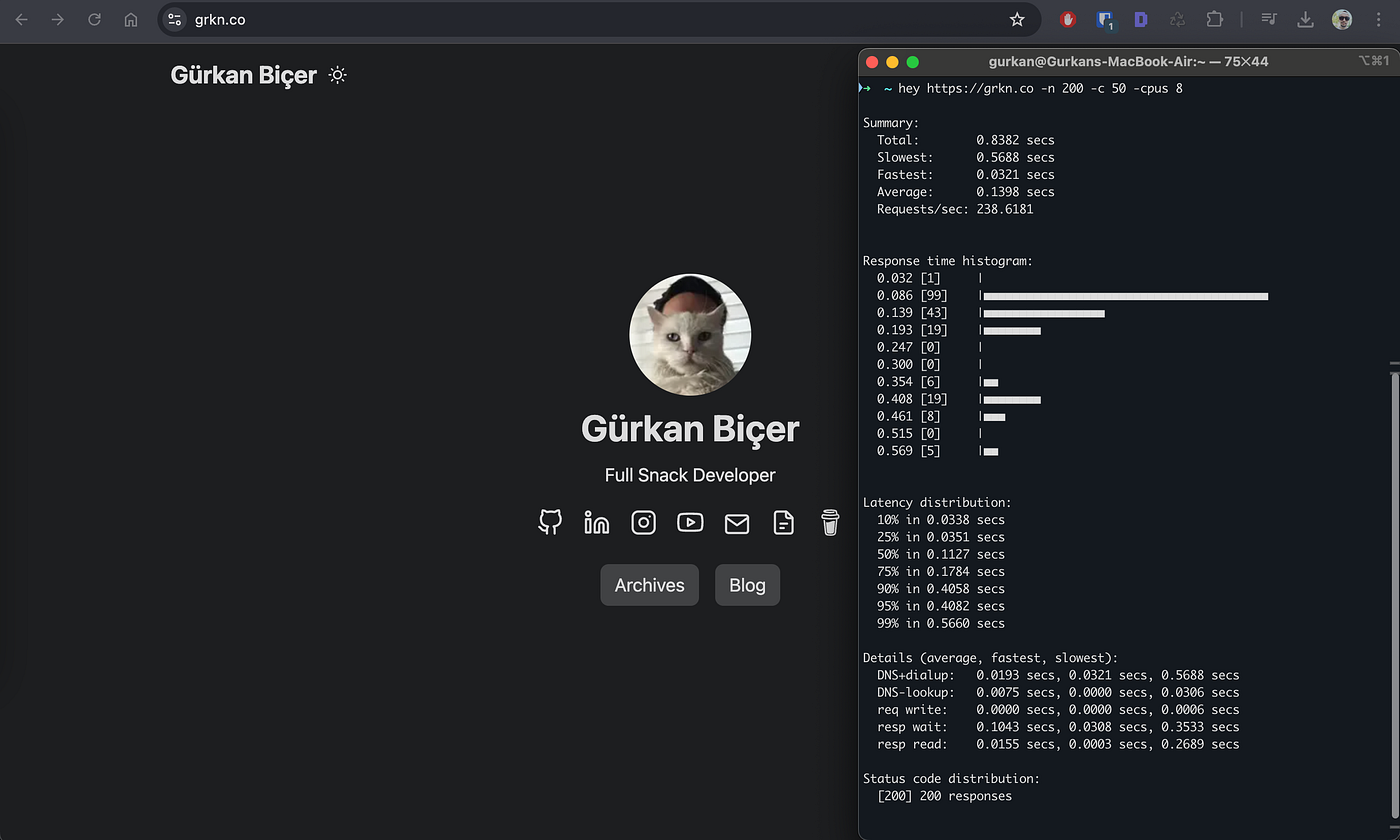
grkn.co websitesinin anasayfası için bir test çalıştırdım. Toplamda 200 istek, 50 eşzamanlı worker ile gönderdim ve 1 saniyenin altında tamamlandı.
Client: Macbook Air M1–8 CPU / 16GB RAM (İzmir, Türkiye) Server: Cloudflare Proxy arkasında Github Pages ❤